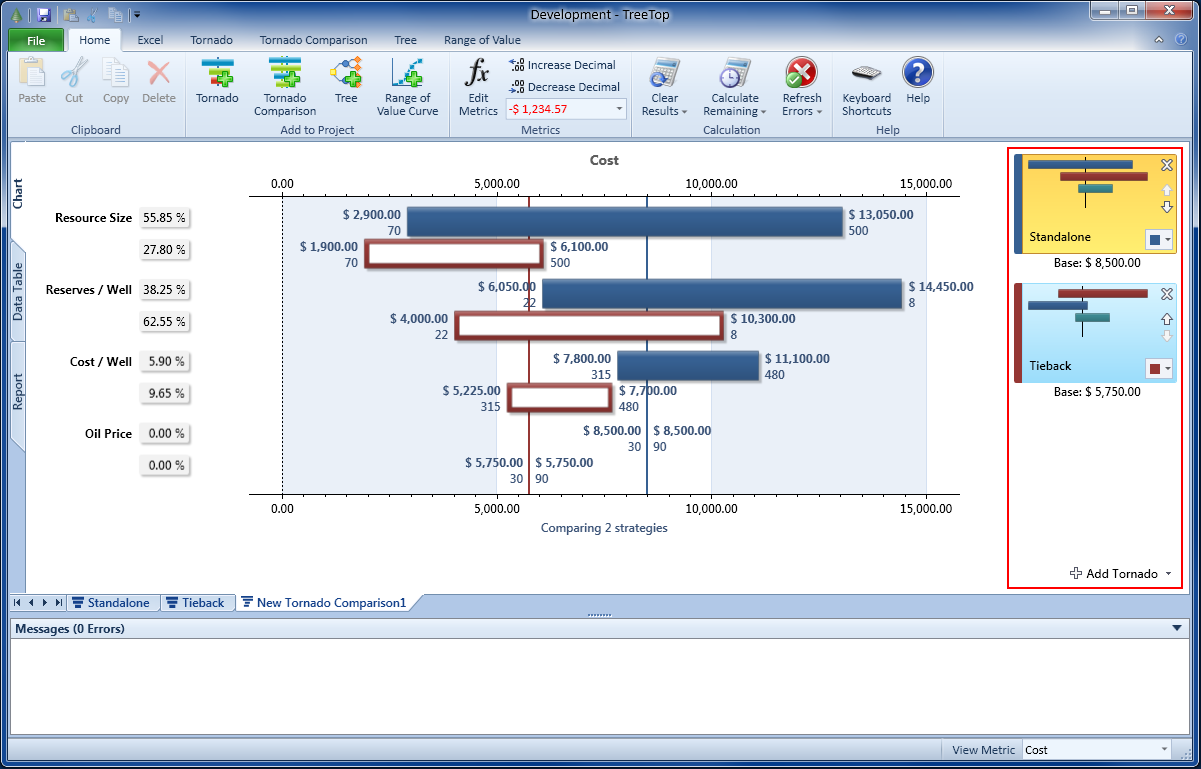
The tornado sidebar contains a list of all tornados that are currently being compared.
The side bar consists of a list of mini tornado pictograms which allow you to edit the order in which bars appear on the chart and choose the primary tornado.
Adding and Removing Tornados
You can add tornaods using the button located at the bottom of the sidebar.
Click on the button and a list of all tornados within your current TreeTop project will be displayed. Note that tornados that are already shown in the current comparison are omitted and
can't be added twice to the same comparison.
To remove a tornado from the comparison, click the delete button in the top right hand side of the corresponding mini tornado pictogram.
The Primary Tornado
You current primary tornado is marked as selected (orange highlight) in the side bar. Click on the pictogram of any of the tornados in the sidebar to assign it to be the primary tornado. The primary tornado serves two functions:
-
It determines the order in which variables are displayed on the chart. The ordering of the primary tornado is used for any variables. If variables are displayed that are not
present in the primary tornado, they appear at the bottom of the chart.
This is important to realize, as some strategies may result in variables appearing in a different order on the underlying Tornado diagrams.
For example, in the screenshot above, Resource Size is the variable with the greatest variance for the Standalone strategy. If the primary tornado is changed to the Tieback strategy, the order of the variables will change and Reserves per Well will become the top-most bar. - The colors of the variable bars are derived from the primary tornado's color settings, if Color by Variable is your current view. The Tornado Comparison View Modes topic outlines this in more detail.
Changing the Order of Tornados
The order in which tornados are displayed in the sidebar determines the order of bars within a bar-group (such as the order of bars displayed for Oil Price).
You can change the order of the tornaods by clicking on the up and down arrows contained whithin each mini tornado pictogram.
Hint: Especially audiences that are not familiar with tornado comparisons will often find it most natural for the primary tornado to be displayed at the top.
Navigate
Next
Tornado Comparison View ModesTornado Comparison Reference
IntroductionBuilding Your First Tornado Comparison
Basic Display Options
Working With the Sidebar
Tornado Comparison View Modes
Data Table
Report and Insights
Other Resources
Introduction to Tornado DiagramsTreeTop Application
Table of Contents